

Server Crash? Here’s How Businesses Can Recover Critical Data
August 4, 2026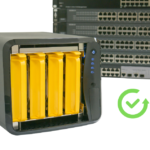
NAS Storage Failed? Everything You Need to Know About NAS Data Recovery
August 4, 2026A CCTV DVR hard drive failure can be a serious concern for homeowners, businesses, hospitals, schools, and offices. Security footage often contains critical evidence needed for investigations, insurance claims, legal cases, or simply reviewing important events.
If your DVR or NVR hard drive has failed, don’t assume your recordings are gone forever. In many cases, CCTV footage can still be recovered with the right recovery techniques.
In this guide, we’ll explain why CCTV hard drives fail, what you should do immediately, and how professional data recovery can help recover valuable surveillance footage.
Why Does a CCTV DVR Hard Drive Fail?
Unlike regular computer hard drives, CCTV hard drives run continuously, often 24 hours a day, 7 days a week. This constant operation increases wear and tear over time.
Common causes include:
- Hard drive failure
- Power outages or voltage fluctuations
- Bad sectors
- DVR software corruption
- Accidental formatting
- Virus or malware infection
- Physical damage
- Water or fire damage
- DVR controller failure
Because surveillance systems continuously overwrite old recordings, acting quickly is essential.
Signs Your DVR Hard Drive Has Failed
You may notice one or more of these symptoms:
- CCTV footage is missing.
- DVR displays “No Hard Disk.”
- Recording has stopped.
- Hard drive clicking noises.
- DVR freezes or restarts repeatedly.
- Playback is unavailable.
- Error messages related to storage.
These signs indicate that the storage device or DVR may require professional attention.
1. Stop Recording Immediately
If your CCTV system is still attempting to record, turn it off if the missing footage is important.
Continuous recording may overwrite footage that could otherwise be recovered.
The sooner you stop using the DVR, the higher the chances of successful recovery.
2. Don’t Format the DVR Hard Drive
Some DVR systems display messages asking you to format the storage drive.
Avoid doing this.
Formatting creates a new file system and can complicate the recovery of valuable surveillance footage.
3. Don’t Replace the Hard Drive Immediately
Many users replace the hard drive before checking whether the existing data can be recovered.
If important footage is stored on the original drive, keep it safely aside and avoid writing any new data to it.
4. Check for Physical Damage
Inspect the DVR and hard drive for signs of:
- Burning smell
- Water exposure
- Loose cables
- Physical impact
- Power supply damage
If the hard drive makes clicking or grinding noises, disconnect it immediately.
5. Avoid Opening the Hard Drive
Opening a CCTV hard drive at home can expose the internal platters to dust and contamination.
Professional recovery laboratories use cleanroom environments specifically designed for recovering data from damaged hard drives.
6. Understand DVR File Systems
Many CCTV systems use proprietary file systems that standard recovery software cannot read.
Professional recovery specialists have specialized tools capable of extracting and rebuilding CCTV recordings from various DVR and NVR brands.
Can CCTV Footage Be Recovered?
Yes, in many cases.
Professional CCTV data recovery experts can often recover:
- Security camera recordings
- Deleted CCTV footage
- Accident recordings
- Theft investigation footage
- Office surveillance videos
- Retail shop recordings
- Warehouse monitoring footage
- School and hospital surveillance data
Recovery success depends on the condition of the hard drive and whether the footage has been overwritten.
What NOT to Do
If your CCTV DVR hard drive fails, avoid these common mistakes:
- Don’t format the hard drive.
- Don’t continue recording on the same drive.
- Don’t repeatedly restart the DVR.
- Don’t open the hard drive.
- Don’t use random recovery software on important evidence.
These actions may permanently overwrite valuable surveillance footage.
When Should You Contact a Professional?
Professional help is recommended if:
- The DVR hard drive isn’t detected.
- Important footage is missing.
- The hard drive is clicking.
- The DVR displays storage errors.
- The footage is needed for legal, insurance, or investigation purposes.
Professional recovery specialists use advanced techniques to recover surveillance footage while preserving data integrity.
Why Choose Arihant Data Recovery?
At Arihant Data Recovery, we understand how valuable CCTV footage can be. Whether it’s evidence for an investigation or critical business surveillance, our experts specialize in recovering data from:
- CCTV DVR Hard Drives
- NVR Storage Systems
- Hard Drives (HDD)
- SSDs
- RAID Servers
- NAS Storage
- Memory Cards
- USB Drives
Our advanced recovery methods help recover surveillance footage securely while maintaining complete confidentiality.
Helpful Links
Explore Our Data Recovery Services:
https://arihantdatarecovery.com/service/
Contact Our Recovery Experts:
https://arihantdatarecovery.com/contact-us/
Read More Data Recovery Guides:
https://arihantdatarecovery.com/blog/
Frequently Asked Questions
Can deleted CCTV footage be recovered?
Yes. In many cases, deleted CCTV footage can be recovered if it hasn’t been overwritten by new recordings.
Why is my DVR saying “No Hard Disk”?
This may indicate hard drive failure, loose connections, power issues, or storage corruption.
Can footage be recovered from a formatted DVR hard drive?
Depending on the condition of the drive and whether new recordings have overwritten the data, recovery may still be possible.
How long is CCTV footage stored?
This depends on the DVR capacity, number of cameras, recording quality, and storage settings. Most systems automatically overwrite old recordings when the storage becomes full.
Final Thoughts
A failed CCTV DVR hard drive doesn’t always mean your security footage is gone forever. The most important step is to stop using the DVR immediately and avoid formatting or replacing the drive before attempting recovery.
Whether you need surveillance footage for legal purposes, business security, or personal peace of mind, acting quickly can significantly improve the chances of successful recovery.
If you’ve lost important CCTV recordings, Arihant Data Recovery provides professional CCTV data recovery services to help recover valuable surveillance footage from DVRs, NVRs, hard drives, and other storage devices safely and securely.


